Set it up in 3 steps
Pick the app you use: Claude, ChatGPT or any other AI agent. The steps change to match.
Go to claude.ai → Customize → Connectors
Press + Add, then Add custom connector.
More help
Works the same on claude.ai and in the Claude desktop app.
Free plan: you can add one custom connector.
Team or Enterprise: an Owner adds it once under Organization settings → Connectors (Add → Custom → Web), then everyone presses Connect on it.
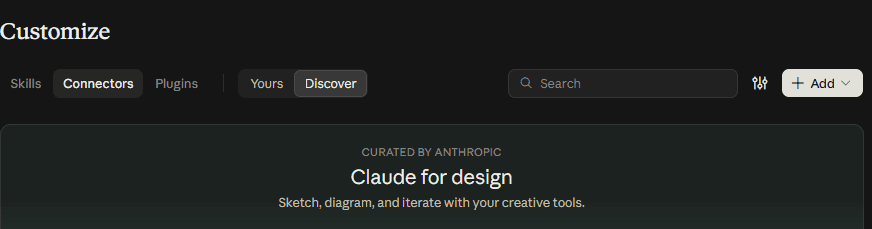
Add a custom connector with this link
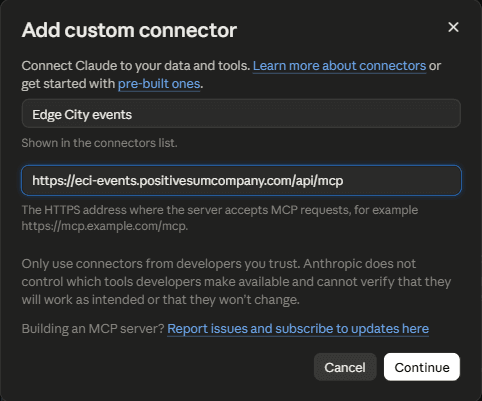
Copy both into the dialog, then press Continue.
Name
Edge City eventsMCP server URL
https://eci-events.positivesumcompany.com/api/mcpMore help
If Claude asks how to sign in, pick Sign in now, and for the OAuth client pick Use Claude's published identity (recommended). Then press Add.
Add your Edge City key on the page that opens
Claude opens a page from this site. Paste your key there and press Connect.
Never paste your key into a chat. Only into the page that opens from this site.
No key yet? Make one in the Edge City portal ↗
More help
In the portal, tick what your AI may do. Read events is always on. If you tick a write box, the portal asks for an expiry. You can delete the key any time.
After Connect, you'll see what your key allows. Press Continue to go back to Claude.
Wondering if it's safe? See how your key is protected.
Connect your EdgeOS key
Your EdgeOS API key
eos_live_••••••••••••
Connect
You're done
Ask Claude anything about Edge City events. Try one of these:
- “What's on tonight at Edge City?”
- “RSVP me to something about AI this week.”
- “Help me host a sunrise swim on Saturday.”
More help
Not answering from Edge City? In a new chat: + → Connectors → switch on Edge City events. The first time, Claude may ask permission for each tool.
You're set
Your AI can now see Edge City events.
Go to ChatGPT → Plugins
In ChatGPT on the web: Plugins → + → Add custom MCP server.
More help
Don't see it? Some plans need developer mode first: Settings → Apps → Advanced settings → Developer mode.
Add a custom MCP server with this link
Copy both in, choose OAuth, then create it.
Name
Edge City eventsMCP server URL
https://eci-events.positivesumcompany.com/api/mcpMore help
ChatGPT shows a warning about custom servers. Press I understand and want to continue.
Add your Edge City key on the page that opens
ChatGPT opens a page from this site. Paste your key there and press Connect.
Never paste your key into a chat. Only into the page that opens from this site.
No key yet? Make one in the Edge City portal ↗
More help
In the portal, tick what your AI may do. Read events is always on. If you tick a write box, the portal asks for an expiry. You can delete the key any time.
After Connect, you'll see what your key allows. Press Continue to go back to ChatGPT.
Wondering if it's safe? See how your key is protected.
Connect your EdgeOS key
Your EdgeOS API key
eos_live_••••••••••••
Connect
You're done
Ask ChatGPT anything about Edge City events. Try one of these:
- “What's on tonight at Edge City?”
- “RSVP me to something about AI this week.”
- “Help me host a sunrise swim on Saturday.”
More help
In a chat, type @ and pick Edge City events, then ask your question.
You're set
Your AI can now see Edge City events.
Let your agent figure it out
- Copy this prompt.
- Paste it into your agent: Gemini, Cursor, Windsurf, Perplexity, or any other.
- It reads our guide, looks up its own app, and adds the server or tells you how.
Help me connect you to the Edge City India events MCP server, so you can find Edge City events for me, RSVP and host events.

1. Read the setup guide: https://eci-events.positivesumcompany.com/connect.md
2. Work out how the app I'm using you in adds a remote MCP server (Streamable HTTP, OAuth sign-in). If you're not sure, search that app's current docs.
3. If you can add it yourself, do it and tell me when to sign in. If you can't, give me short numbered steps for my exact app, with the server URL to paste.

Never ask me to paste my EdgeOS key into this chat. I'll paste it only on the page that opens when I sign in.
Never paste your key into a chat. Only into the page that opens from this site.
Or set it up yourself:
Add it to your client
MCP server URL (Streamable HTTP)
https://eci-events.positivesumcompany.com/api/mcpClaude Code
claude mcp add --transport http eci-events https://eci-events.positivesumcompany.com/api/mcpJSON config (Cursor, VS Code, Windsurf)
{
  "mcpServers": {
    "eci-events": { "url": "https://eci-events.positivesumcompany.com/api/mcp" }
  }
}
Or let your agent do it
Paste this link to your agent
https://eci-events.positivesumcompany.com/connect.mdAuth and protocol details
- MCP 2026-07-28, stateless; 2025-11-25 clients work too.
- OAuth 2.1 with PKCE S256; CIMD and DCR. No token in the URL.
- Sign-in opens
/connect; paste an EdgeOS key from /portal/agentic-access. Tools follow the key's scopes. - Start with
edgeos_initialize; writes go throughedgeos_propose→edgeos_confirm. - Every instruction: /how-it-works · Key handling: /trust
Why it's safe
Your key is never stored
Locked away from us and from your AI.
More
It travels locked inside a token only this server can open, and only for the moment it's needed. Your AI never sees it.
How this works, in detailOpen source
Anyone can check the code that runs.
More
The code is public on GitHub, and the page shows exactly which version is live.
See the running versionI don't know how this works shows everything we tell your AI.
What we track
Anonymous usage counts and errors. Nothing you ask.
More
Only usage counts, so we know how many people use this, and errors, so we can fix what breaks. It's anonymous: each connection gets a scrambled id that can't be turned back into your key, your name or your account. We never keep your key, so we can't tell who you are, and we don't record what you ask or the details of events.
Full list of what's measured